HS2 Digital Wayfinding
Designing a more accessible wayfinding experience for Britain’s next generation of high speed rail
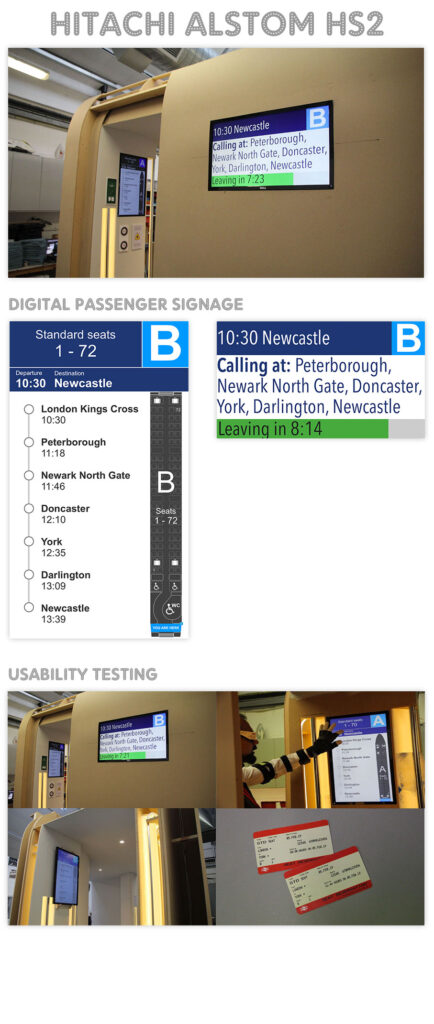
As part of Hitachi’s work with Alstom on the UK’s High Speed 2 (HS2) programme, I contributed to usability testing for the digital wayfinding experience designed for passengers travelling through the train.
The work involved testing the experience inside a full scale train mock-up, using participants with a range of accessibility needs, including wheelchair users, visually impaired passengers and elderly passengers using walking sticks.
My role was to turn real passenger experiences into structured, measurable evidence that could be used by the design and engineering teams to improve both the digital wayfinding experience and the physical accessibility of the train environment.
The challenge
Wayfinding inside a train is more complex than simply showing passengers where to go.
Passengers need to understand information quickly while moving through a physical environment. For some passengers, the challenge is significantly greater.
A wheelchair user needs sufficient space to manoeuvre through the train and turn comfortably.
A visually impaired passenger may interact with the environment differently and rely more heavily on physical cues and intuitive positioning.
An elderly passenger using a walking stick may need additional stability, manageable inclines and clearly positioned hand rails.
The objective was therefore not simply to ask whether passengers could use the digital wayfinding boards.
It was to understand whether the entire passenger journey through the train was accessible, intuitive and physically manageable.
This included questions such as:
Can passengers find the information they need?
Can they understand it quickly?
Can they act on it confidently?
Does the physical environment support the digital information?
Does a wheelchair user have enough space to manoeuvre and turn?
Are ramps smooth and are their inclines manageable?
Are hand rails positioned where passengers would intuitively expect them?
Can passengers with different mobility and visual needs navigate the train safely and independently?
Testing with real users
I helped design and facilitate usability testing with participants representing different passenger needs, including:
- Wheelchair users
- Visually impaired passengers
- Elderly passengers using walking sticks
- Other passengers with different accessibility requirements
Rather than testing the interface in isolation, participants experienced the wayfinding system within a physical train environment.
This was important because the usability of a wayfinding system depends on much more than the screen.
The position of the display, visibility, passenger movement, available space, surrounding infrastructure and accessibility of the route can all affect whether the information actually works.
For wheelchair users in particular, we considered whether the physical layout provided enough space to move through the train and turn where necessary.
We also observed the usability of ramps and their inclines, the smoothness of transitions and the positioning of hand rails, considering whether these physical features supported passengers naturally rather than requiring them to work out how the environment was intended to be used.
Testing the physical and digital experience together
The full scale mock-up allowed us to test something that would be difficult to identify through conventional screen based usability testing.
A wayfinding instruction may be perfectly understandable on a display, but that does not necessarily mean the passenger can physically follow it.
For example, the route indicated by the digital wayfinding system also needs to work for someone using a wheelchair, someone with limited mobility or someone with a visual impairment.
This meant looking at the complete interaction:
Information → understanding → movement → physical environment → destination
The physical train became part of the UX.
Creating the test methodology
I was responsible for helping turn the design questions into a structured usability testing process.
This included:
Preparing test scripts
I developed scripts and scenarios that gave participants realistic tasks to complete while allowing us to observe where they encountered difficulties.
Facilitating sessions
I facilitated testing sessions directly with participants, guiding the research while avoiding influencing their behaviour or responses.
Observing behaviour
I looked beyond whether a participant eventually completed a task.
I identified where they hesitated, became confused, struggled to interpret information or encountered physical accessibility barriers.
This included observing how participants interacted with the train environment itself, such as manoeuvring through spaces, using ramps and interacting with hand rails.
Creating a scoring system
I helped establish a structured scoring approach so usability issues could be compared and communicated consistently.
Quantifying findings
Rather than relying solely on qualitative observations, I translated usability problems into measurable findings that could be communicated back to the wider design and engineering team.
From observations to evidence
One of the most valuable aspects of the testing was turning individual participant experiences into evidence that could influence design decisions.
For example, instead of simply reporting:
“Some users found the wayfinding confusing.”
the testing process allowed issues to be recorded and quantified so the team could understand:
- How frequently an issue occurred
- Which user groups were affected
- Where in the journey the problem appeared
- How severe the usability issue was
- Whether a design change improved the experience
The same principle applied to the physical environment.
An accessibility observation could be translated into a specific design issue, such as insufficient manoeuvring space, a difficult ramp transition or a hand rail position that was not intuitive for users.
This created a much clearer feedback loop between user research and product development.
Designing inside the real environment
The train mock-up provided an important opportunity to test the relationship between the digital experience and the physical environment.
Participants were able to experience the wayfinding boards as they would in a real train rather than looking at a prototype on a desktop or tablet.
They could physically move through the environment, interact with the space and encounter the constraints that passengers would experience in reality.
This exposed issues that would be difficult to identify through conventional screen based usability testing.
The experience became:
Digital information + physical environment + passenger behaviour + accessibility
rather than simply a UI problem.
Seeing the train improve week by week
A particularly rewarding part of the project was seeing the physical train mock-up evolve throughout the testing process.
The research created a continuous feedback loop:
Test → identify issue → quantify → communicate → redesign → test again
Week by week, the train environment and wayfinding experience could be improved based on evidence from passengers.
This included not only improvements to the digital wayfinding experience, but consideration of the physical environment around it, including passenger movement, manoeuvring space, ramps, inclines and hand rail positioning.
The result was a much more tangible relationship between research and design.
Instead of research becoming a report that sits at the end of a project, findings were actively feeding into the ongoing design and development of the train experience.
My contribution
I contributed to the usability testing process across research planning, facilitation, accessibility, measurement and feedback.
My responsibilities included:
Usability Research
Planning realistic tasks and scenarios for testing the passenger experience.
Accessibility Research
Testing the experience with passengers with different mobility and visual accessibility needs.
Physical Environment Testing
Observing wheelchair manoeuvrability, available space, ramps, inclines, hand rails and other physical aspects of the passenger environment.
Test Facilitation
Personally facilitating sessions and observing participant behaviour.
Research Methodology
Preparing scripts, scenarios and structured testing methods.
Quantitative Usability Measurement
Creating a scoring system to turn observed usability problems into measurable evidence.
Insight & Communication
Communicating findings clearly to designers, engineers and project stakeholders.
Iterative Design
Feeding findings back into the development process and seeing improvements tested week after week.
What this demonstrates
This project represents how I approach UX in complex physical and digital environments.
I don’t treat accessibility as a checklist applied at the end of a project.
I use real people, realistic scenarios and structured evidence to understand whether an experience actually works in the real world.
Importantly, I look beyond the interface itself.
For this project, that meant understanding the relationship between digital information, physical space, mobility, accessibility and human behaviour.
The work also demonstrates my ability to operate within large, multidisciplinary engineering projects, translating human behaviour into evidence that designers and engineers can use to make better product decisions.
Skills demonstrated
UX Research
Usability Testing
Accessibility & Inclusive Design
Quantitative UX
Research Methodology
Test Facilitation
Physical + Digital UX
Physical Environment Design
Complex Environments
Journey Design
Evidence-based Design
Iterative Product Development
Stakeholder Communication
Rail & Transportation UX